
Move beyond basic corner pinning with edge and internal point control for more accurate surface alignment.
Projection mapping software for real-time visual warping.
HoloMapper is real-time projection mapping software for creators, VJs, digital artists, installations, stage visuals, and visual experiments. Map images, videos, GIFs, text, animations, Bezier curves, custom shapes, and live NDI or Spout sources onto walls, objects, rooms, and physical surfaces using mesh warping, snapping tools, presets, and a clean projector output workflow.
Official Steam listing: HoloMapper on Steam
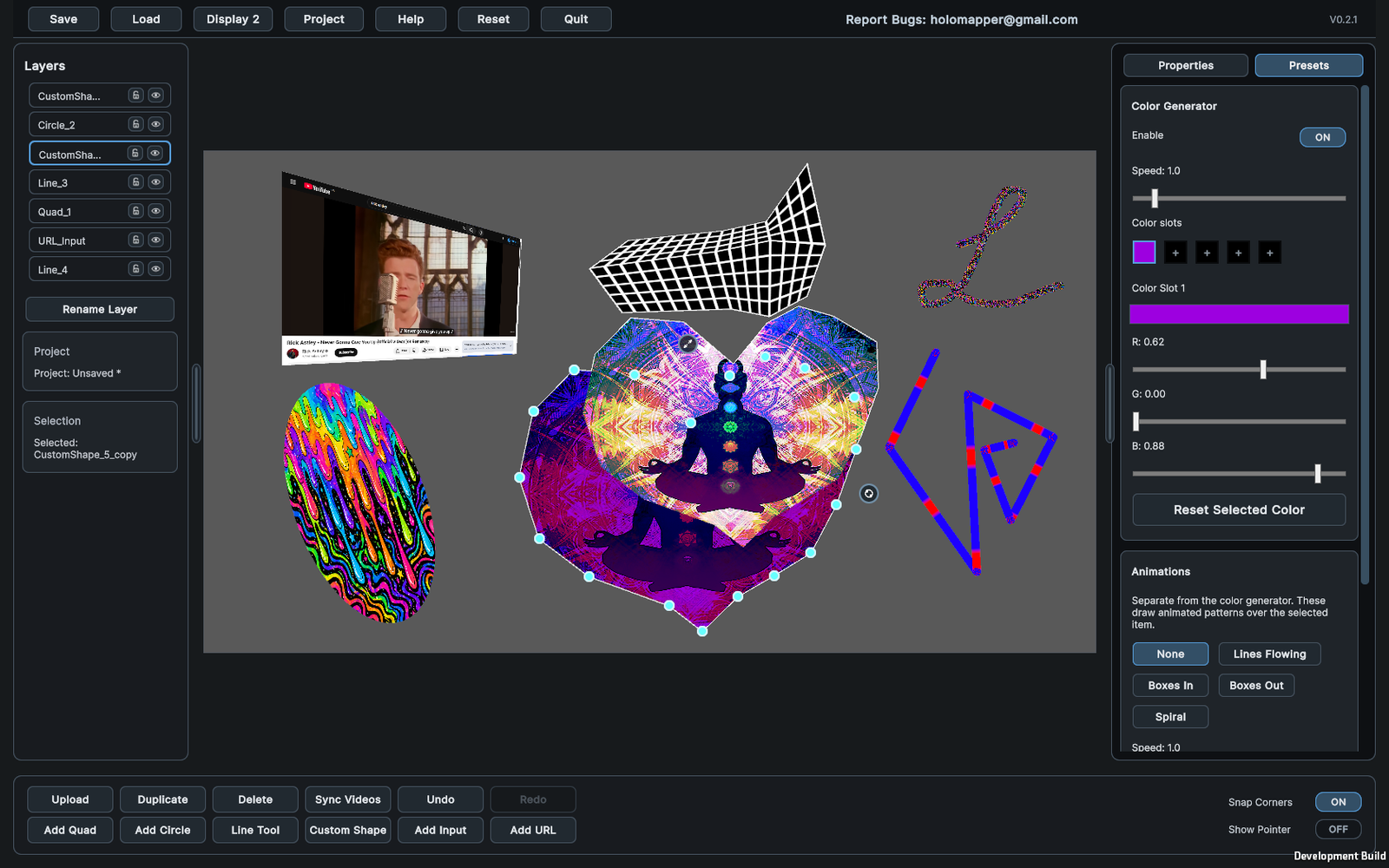
Real-time projection mapping workspace
Bring live sources into HoloMapper or send mapped visuals out to compatible NDI and Spout workflows.
Control HoloMapper on your main screen while sending the mapped output to a projector or external display.
Projection Mapping Features
Shape images, videos, GIFs, text, live sources, and animations onto real-world surfaces.
HoloMapper focuses on the core tools needed for practical projection mapping: surface creation, mesh warping, media placement, NDI and Spout live I/O, snapping, layer control, and fast live editing.
Advanced mesh warping
Add and adjust warp points to fit visuals onto angled, uneven, curved, or irregular surfaces. Mesh warping gives you more control than simple four-corner alignment.
Mesh Points
Warp Lines
Surface Control
NDI and Spout input/output
Use NDI and Spout to bring compatible live video sources into your mapping project, or send HoloMapper output to other visual tools that support those workflows.
NDI Input
NDI Output
Spout Input
Spout Output
Bezier curve support
Create smooth curved visual elements for organic mappings, decorative outlines, abstract designs, and projection layouts that do not fit a simple rectangle.
Curves
Smooth Shapes
Creative Mapping
Text mesh warping
Add text layers and warp them onto surfaces just like visual layers. Useful for signs, labels, stage text, projected titles, and stylized typography.
Text Layers
Warped Type
Editor Frames
Multiple surface tools
Build projection layouts with quads, circles, lines, freehand drawing, custom filled shapes, Bezier curves, and text layers.
Quads
Circles
Shapes
Images, videos, GIFs, and animations
Import visual media, map it to surfaces, adjust placement, and build layered projection scenes. GIFs, GIPHY importing, and MP4 animation presets help you build motion quickly.
Images
Videos
GIFs
MP4 Presets
Snapping and Auto Aspect
Align layouts faster with side, corner, and rotation snapping. Auto Aspect can automatically match a quad to the aspect ratio of imported media.
Corner Snap
Rotation Snap
Auto Aspect
Presets and color controls
Use color generators, animation presets, transparency controls, and visual settings to create fast projection effects without needing a complex VJ setup.
Layer management
Organize surfaces, duplicate layers, group items, adjust order, hide or lock layers, and manage complex projection scenes more easily.
Clean projector output
Work from your control screen while sending the final mapped visual output to a projector or external display for the audience-facing projection.
Live Inputs and Outputs
Connect HoloMapper to NDI and Spout workflows.
HoloMapper can work with NDI and Spout for more flexible live visual setups, letting you bring compatible sources into your mapping scene or send mapped output into other visual tools.
Live video for projection mapping
Use NDI and Spout when your projection setup needs live camera feeds, another visual application, VJ software, streaming tools, or a multi-app workflow instead of only imported files.
- NDI input for bringing compatible network video sources into mapped surfaces.
- NDI output for sending HoloMapper visuals to other NDI-capable tools.
- Spout input for using compatible local GPU/shared-texture visual sources.
- Spout output for sending mapped visuals into compatible Spout workflows.
- Status monitoring helps show whether live NDI and Spout sources are connected.
- Works alongside imported images, videos, GIFs, GIPHY content, text, shapes, and animation presets.
Media and Surface Types
Use the right layer for the projection you are building.
▭
Quad Surfaces
Classic projection mapping surfaces with corner control, mesh warping, snapping, and Auto Aspect.
◯
Circle Surfaces
Round surfaces with depth and bulge controls for circular projection designs.
〰
Bezier Curves
Smooth curved elements for outlines, abstract visuals, and non-rectangular mapping.
✦
Custom Shapes
Create filled shapes for irregular surfaces, creative masks, props, and installation pieces.
🎞
Video Layers
Map video content to surfaces with real-time placement and projection controls.
⌁
NDI Sources
Bring compatible network video into HoloMapper or send mapped output to NDI-capable tools.
⇄
Spout Sources
Use compatible Spout input and output workflows for local live visual pipelines.
◎
GIF Support
Add animated GIFs for quick looping visual effects and lightweight motion layers.
T
Warped Text
Create text layers and mesh warp them onto physical surfaces.
▣
Animation Presets
Import MP4 presets and combine them with mapped surfaces and visual layouts.
Experimental inputs: HoloMapper also includes URL/browser layers, external window inputs, and live-source workflows.
These are useful for testing live sources, but compatibility and performance may vary depending on the website, application,
source, system, and network conditions.
Use Cases
Projection mapping software for artists, events, installations, and experiments.
Projection mapping creators
Build mapped visuals for walls, objects, custom surfaces, small rooms, art pieces, and experimental setups.
VJs and live visual performers
Combine video, GIFs, animation presets, curves, text, and shapes into layered projector-ready visuals.
Installations and event visuals
Prepare projection layouts for exhibits, signs, stage pieces, props, displays, and temporary event builds.
Creative developers and tinkerers
Prototype visual mapping ideas with flexible surfaces, mesh control, snapping, masks, and real-time editing.
Basic Workflow
From blank workspace to mapped projector output.
Add a surface
Start with a quad, circle, line, Bezier curve, custom shape, text layer, image, video, GIF, live source, or preset.
Place your media
Upload, create, or connect visual content, then adjust fit, fill, scale, placement, transparency, color, and layer order.
Warp and align
Use corners, mesh points, curves, snapping, and Auto Aspect to fit visuals onto your real-world surface.
Project and save
Send the clean output to a projector or external display, then save your project for future editing.
Platforms
Available on Steam for Windows, Linux, SteamOS, and Steam Deck workflows.
HoloMapper is designed around practical projector setups: control the editor from one screen and send the final mapped visuals to a projector or external display.
Minimum
- Windows 10 64-bit or compatible Linux / SteamOS setup
- Intel Core i3-2100 / AMD equivalent
- 4 GB RAM
- Integrated graphics such as Intel HD 4000 or equivalent
- DirectX 11 on Windows
- 200 MB storage
Recommended
- Windows 10 / Windows 11 64-bit, Linux, or SteamOS
- Intel Core i5-8400 / Ryzen 5 2600 or better
- 16 GB RAM
- NVIDIA GTX 1050 / AMD RX 560 or better
- Projector or external display for mapped output
- 2 GB storage for projects, cached media, and working files
FAQ
Projection mapping software questions.
What is HoloMapper?
HoloMapper is real-time projection mapping software on Steam. It helps creators map images, videos, GIFs, text, animation presets, Bezier curves, custom shapes, and live NDI or Spout sources onto physical surfaces using warping, snapping, layers, and projector output tools.
Is HoloMapper Subscription Based?
No! We don't believe in subscriptions. You buy it, you own it.
Where can I see what changed?
The full HoloMapper changelog is available at holomapperstudio.com/changelogs/.
Does HoloMapper support mesh warping?
Yes. HoloMapper supports mesh warping for more detailed projection alignment. Mesh points and warp controls help fit visuals onto surfaces that are not perfectly flat, rectangular, or straight.
Can I map GIFs, videos, live inputs, and text?
Yes. HoloMapper supports image, video, GIF, text, animation preset, NDI, and Spout workflows. Text layers can also be mesh warped, which is useful for projected signs, titles, labels, and stylized typography.
Does HoloMapper support Steam Deck?
Yes. HoloMapper supports Linux, SteamOS, and Steam Deck workflows. For projector use on Steam Deck, Desktop Mode running Proton Experimental may be required.
Does HoloMapper include live inputs and outputs?
Yes. HoloMapper includes NDI and Spout input/output workflows, plus experimental URL/browser layers and external window inputs. Compatibility and performance can depend on the source, application, system, network, and content being used.
HoloMapper on Steam
Build mapped visuals with mesh warping, curves, GIFs, text, videos, NDI, Spout, and projector output.
Download HoloMapper in Early Access on Steam, read the documentation, view the changelog, and follow development as the projection mapping workflow continues to improve.