
Move, reshape, warp, mask, and align visuals while your projection layout stays editable.
Now Available in Early Access on Steam
Projection mapping software for real-time visual alignment.
HoloMapper is a Windows projection mapping tool for creators, artists, installations, and event setups. Add images, videos, generated presets, window inputs, or live web pages, then map them onto physical surfaces using quads, circles, lines, custom shapes, corner warping, mesh warping, masks, chroma key, and clean projector output controls.
Official Steam listing: HoloMapper on Steam
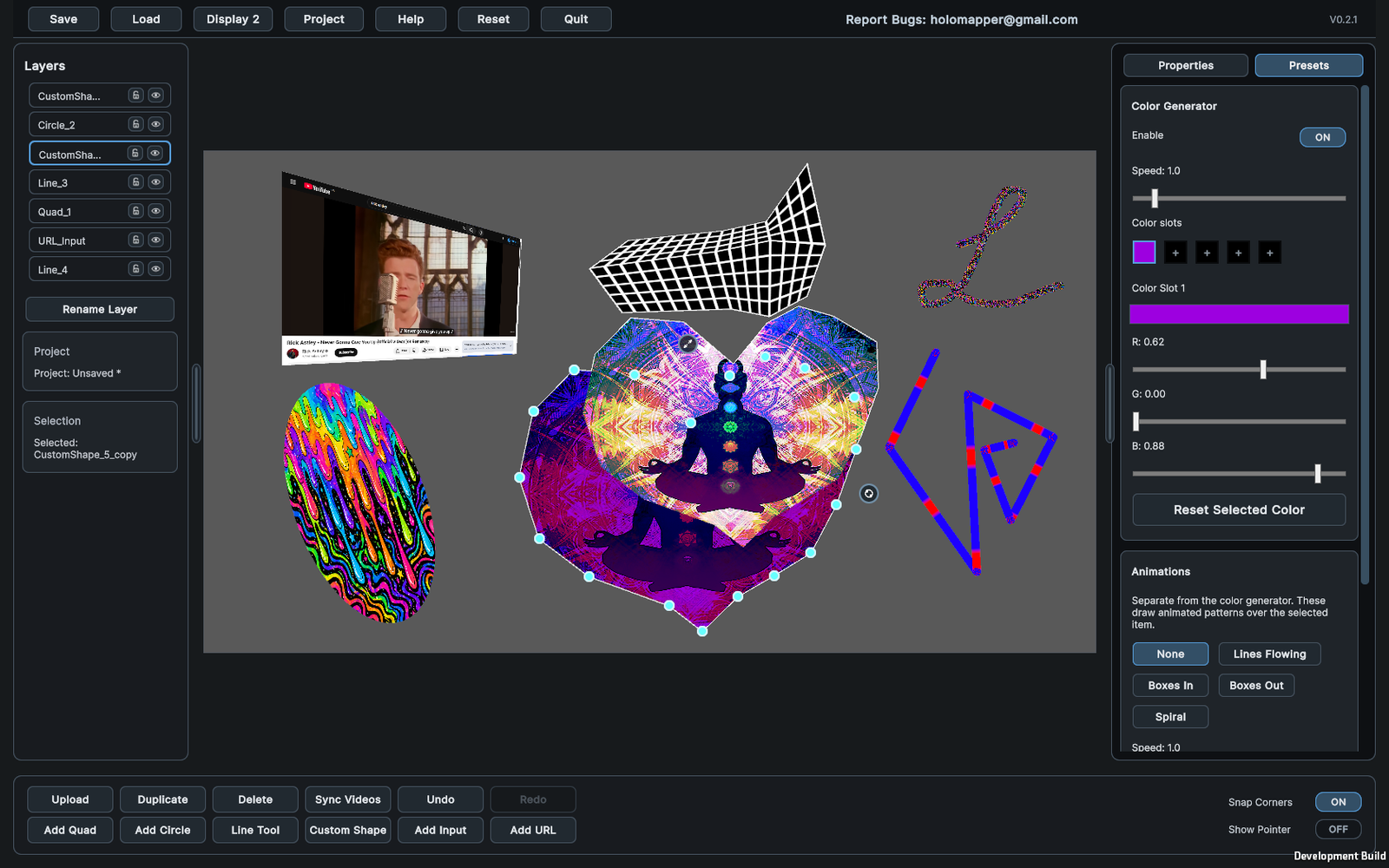
Live editing workspace for projection mapping
Create quads, circles, lines, and custom filled shapes for different projection targets.
Choose an output format, select a display, rotate output if needed, and project a clean view.
Projection Mapping Features
Tools for shaping visuals onto real-world surfaces.
Quads, circles, lines, and custom shapes
Build standard rectangular surfaces, round surfaces, line-based visuals, or custom filled shapes for irregular projection areas, props, signs, panels, and stage pieces.
Corner warping and mesh warping
Use simple four-corner alignment for standard projection mapping, or add mesh points and warp lines when a surface needs more detailed correction.
Media movement inside surfaces
Pan, zoom, stretch, rotate, fit, fill, or reset media inside a selected surface without moving the surface itself. Useful for fine-tuning images, videos, window inputs, and URL inputs.
Masks and chroma key
Hide parts of a surface with freehand or line masks, fill closed mask shapes, invert masks, and remove selected colors using chroma key threshold and softness controls.
Visual presets and generated effects
Use preset effects such as color generators and simple animations, then adjust speed, thickness, count, direction, colors, and transparency from the Presets tab.
Window and URL inputs
Add selected windows or live web pages as projection surfaces. Input features are experimental and may depend on the source app, website, and system behavior.
Layer management
Organize surfaces from front to back, hide or lock layers, rename surfaces, duplicate selected surfaces, and use multi-select for editing multiple items together.
Output format and rotation
Select the output resolution and aspect ratio for the clean projector view, and rotate the output in 90-degree steps for sideways or upside-down projector mounting.
Use Cases
Projection mapping software for creators, installations, and experiments.
Projection mapping beginners
Start with simple quads, upload an image or video, adjust corners, choose your output display, and build a basic mapped projection setup.
Digital artists and VJs
Map videos, generated presets, web pages, and visual content onto stage elements, props, objects, walls, and experimental setups.
Installations and live events
Prepare projection-ready output for room geometry, exhibits, signs, irregular surfaces, immersive environments, and temporary event layouts.
Creative developers and tinkerers
Prototype projection experiences that need flexible shapes, live inputs, layered visuals, masks, output control, and precise physical alignment.
Basic Workflow
From blank workspace to projector output.
1. Add a surface or input
Add a quad, circle, line, custom shape, window input, or URL input depending on what you want to map.
2. Add media or configure the source
Upload PNG, JPG, JPEG, or MP4 files, configure a URL input, select a window input, or use generated presets.
3. Align and style
Move, rotate, scale, warp, mask, chroma key, adjust media placement, or style the surface as needed.
4. Project and save
Choose an output format and display, press Project, sync videos if needed, and save your project as an .hmap file.
Windows Projection Mapping Software
System requirements for HoloMapper on Steam.
Minimum
- Windows 10 64-bit
- Intel Core i3-2100 / AMD equivalent
- 4 GB RAM
- Integrated graphics such as Intel HD 4000
- DirectX 11
- 200 MB storage
Recommended
- Windows 10 or Windows 11 64-bit
- Intel Core i5-8400 / Ryzen 5 2600 or better
- 16 GB RAM
- NVIDIA GTX 1050 / AMD RX 560 or better
- DirectX 11
- 2 GB storage for projects, cached media, and working files
FAQ
Projection mapping software questions.
What is HoloMapper?
HoloMapper is Early Access projection mapping software on Steam for Windows. It helps align images, videos, generated visuals, window inputs, URL inputs, and custom surfaces onto physical projection areas using real-time editing, warping, masking, and output controls.
Is HoloMapper available on Steam?
Yes. HoloMapper is available in Early Access on Steam.
What can I map with HoloMapper?
HoloMapper is designed for projector mapping on walls, objects, room geometry, stage pieces, signs, props, installations, exhibits, and other physical surfaces.
Does HoloMapper support more than rectangular surfaces?
Yes. HoloMapper supports quads, circles, line surfaces, and custom filled shapes. You can also use corner warping, mesh warping, masks, and media movement controls to refine the final result.
Can HoloMapper use live sources?
HoloMapper includes experimental window input and URL input tools. These can add selected windows or live web pages as surfaces, though behavior may depend on the source app, website, and system.
Can I rotate projector output?
Yes. HoloMapper includes output rotation, which turns the clean output clockwise by 90 degrees each time it is pressed. This can help with sideways or upside-down projector mounting without rotating the editor view.
HoloMapper on Steam
Start building mapped visuals with HoloMapper.
Download the Early Access version on Steam, read the documentation, and follow development as the projection mapping workflow continues to improve.
Open HoloMapper on Steam